










Business & Branding
Create your own business case, write a scenario description and choose AI-generated images or upload your own visuals.
From Idea to Simulation in 5 Minutes
Build a digital marketing simulation around your own business case, products, customer personas and target markets. Customize the learning experience to your course objectives, with support for nine languages.
Customize Every Part of Your Scenario
A scenario defines the learning environment where students develop and apply their digital marketing skills. You can customize markets, products, customer personas, and market conditions to shape the decisions students make throughout the simulation.
Create your own business case, write a scenario description and choose AI-generated images or upload your own visuals.
Choose from 2 to 20 learning topics across six digital marketing areas: Website & SEO, Search Advertising, Email Marketing, Social Media, Brand Community and Affiliate Marketing.
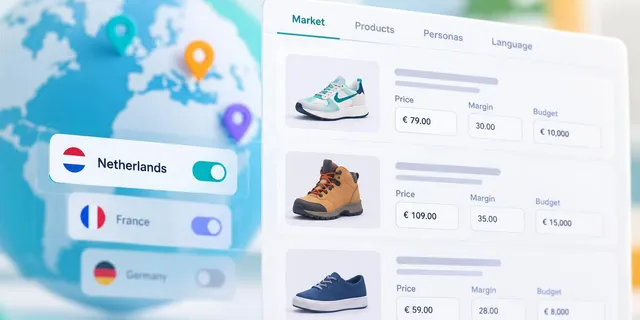
Add up to nine products per market, each with its own pricing, profit margins and marketing materials.
Develop customer personas based on location, age, interests, purchasing habits and needs to give students realistic target audiences.
Create up to three markets, assign a language to each and set advertising budgets to reflect different market conditions.
Review and adjust keywords used in the search advertising simulation before making the scenario available to students.
How it works
The Scenario Tool guides you through four stages of setup, with optional AI assistance to help you develop initial content and customize it to meet your specific needs.
Learning Topics and Level
Describe the business and its products or services, select the digital marketing topics to be covered and choose the intended level of instruction.
Simulation
Set up to three markets with distinct products, languages and customer personas. Generate a starting point with AI, build your own content or reuse settings from an existing market.
Sync Content
Review and adjust based on market reports, audience insights and business conditions for each simulation round. Learning content is provided in the language of each market and can be edited before students begin.
Publish
Use the validation checklist to review your setup. Simbound then prepares the website, advertising, email and social media content for each market, so your completed scenario is ready to use in your course.
Build scenarios across a range of industries, products and markets. These examples show how instructors can use different business contexts to teach practical digital marketing skills.

Retail · Foundational
FunToys is an online retailer offering toys, games and leisure products for all ages, from teddy bears and remote-control cars to chess sets and gaming consoles. In this scenario, students develop digital marketing campaigns, target different customer segments and analyse performance to improve sales and profitability in a competitive retail market.

Home & lifestyle · Intermediate
SoleStock is a Dutch online footwear retailer offering discounted sneakers, hiking shoes, sports shoes and casual footwear from well-known brands. In this scenario, students develop digital marketing campaigns, target price-conscious customer segments and analyse performance to increase sales and profitability in a competitive footwear market.
Fitness · Intermediate
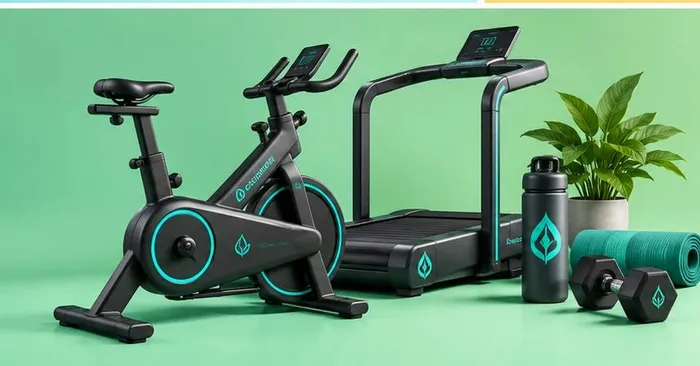
Evoltiva Fitness, a leader in wellness tech, offers luxury gyms featuring MuscleWatt™ equipment, allowing members to create energy while working out. This unique concept powers the facilities and charges devices, promoting a zero-carbon footprint. Evoltiva’s mission champions enhanced human strength and a healthier planet. This is a A 10-round simulation.
AI Scenario Authoring
AI can help generate initial products, customer personas and round-by-round market reports. Instructors can review, revise and approve the content before introducing the scenario to students.
Cooler weather is shifting demand from cold brew towards espresso blends. Gift searches start rising.
Urban 25–34 buyers respond best to subscription offers; Rural audiences prefer one-off bundles.
Margins on the Gift box rise 5% this round. Cold brew kits lose profit.
Instructional Level
Choose the learning level that best suits your students. The Scenario Tool adjusts the scope and complexity of its generated content to match.
Introduce essential digital marketing concepts through accessible, hands-on activities. Ideal for introductory courses and learners with limited prior experience.
Apply digital marketing knowledge to realistic business challenges. Suitable for advanced students, working professionals and executive education programmes.
Focus on strategic planning, budget allocation and performance evaluation. Designed for advanced learners, managers and business leaders.
Frequently Asked Questions
You can access the Scenario Tool from your instructor dashboard beside the “New Simulation” button. If you do not see it, contact our team to request access.
No. The Scenario Tool guides you through four steps and offers optional AI assistance. You can create, review and edit your scenario without coding or design skills.
Creation time depends on the complexity of your scenario and how much you choose to customize. AI assistance can help you build a working scenario in 5 minutes.
Each scenario supports up to three markets, with a language assigned to each. The Scenario Tool supports nine languages and can generate learning content tailored to each market.
Yes. You can review and edit products, customer personas, market reports, keywords and learning topics before publishing your scenario.
Yes. You can reuse completed scenarios in future courses and share them with other instructors at your institution.
The Scenario Tool is available through a Simbound instructor account. Contact us to learn about access and licensing options for your course or institution.
See how the Scenario Tool can help you develop a digital marketing simulation aligned with your teaching objectives.